Connecting QuickBooks to fabrication software without double entry.
When estimates, invoices, and job costs live in separate systems, the office re-keys data and errors creep in. Connecting QuickBooks to your fabrication software keeps the books and the shop in sync.
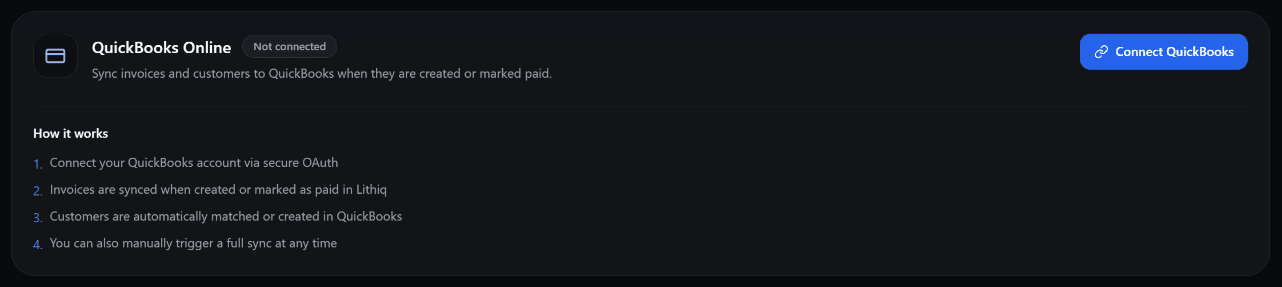
QuickBooks integration — invoices and payments sync from Lithiq OS automatically.
Why connect QuickBooks to fabrication software
Most countertop shops run on two records that should be one: the job record in the fabrication software and the financial record in QuickBooks. When those are disconnected, the office types every invoice twice, reconciles payments by eye, and discovers mismatches during tax season. A connection removes the second entry entirely.
The payoff is not just speed. Re-keying is where transcription errors are born — a transposed digit on an invoice, a payment posted to the wrong customer, a job that looks profitable until the ledger says otherwise. Syncing from a single source of truth keeps the shop floor and the accounting books telling the same story. See the broader picture in our fabrication platform overview. If you are choosing a platform first, our job shop software for QuickBooks comparison covers what shop software adds on top of the books.
What should sync (invoices, payments, items, customers)
A useful integration syncs four things. Invoices flow from the fabrication software into QuickBooks so the AR ledger stays current. Payments flow back so the books show what is actually collected, not just billed. Items — slab materials, edge profiles, labor — map to your Chart of Accounts so revenue and cost land in the right buckets. And customers created on the floor appear in accounting without a duplicate set of records.
The mapping matters more than the connection itself. If a quartz remnant is billed as a generic line item, you lose the cost visibility that makes job costing worthwhile. Clean item mapping is what turns a sync into real reporting. Our quoting software guide covers how those line items get built in the first place.
Lithiq OS is the stone fabrication platform behind this article. Draw surfaces, track slabs, schedule crews, and quote jobs — all in one place.
QuickBooks Online vs Desktop
QuickBooks Online is the natural fit for cloud fabrication software because it exposes a live API the software can call directly — invoices post the moment they are created. QuickBooks Desktop can sync, but it typically needs a connector running on a local machine, and the link is more fragile because it depends on that computer staying online and signed in.
For a shop choosing today, Online removes a whole class of "the sync stopped working because the office computer restarted" problems. Desktop still suits businesses with specific inventory or industry editions, but budget for the extra glue it takes to keep the two talking. Either way, the goal is the same: one invoice, entered once.
Job costing without spreadsheet gymnastics
Job costing is where the integration earns its keep. When the fabrication software captures material used, labor hours, and time per job, and maps those to QuickBooks accounts, you can see profit per job without exporting two CSVs into a pivot table. A granite island that looked like a winner suddenly shows thin margins once the remnant waste is counted.
The discipline that makes this work is capturing cost at the source. Estimators who build jobs from real material and labor rates, as described in our estimating guide, feed the accounting system numbers it can actually trust. The books then answer "which jobs pay?" instead of just "what did we bill?"
A clean monthly close
The test of any integration is the monthly close. With a working sync, the close starts from matched records: invoices, payments, and items already line up, so the accountant reconciles instead of reconstructing. Discrepancies show up as exceptions to review, not as a blank spreadsheet to fill.
Shops that run connected systems also close faster because nobody is chasing the field for missing paperwork. The job record already carries what was sold, cut, and collected. For shops managing many jobs at once, the operational side of this is covered in our shop management guide — the accounting connection is what makes that operational data financial.
Frequently asked questions
Can fabrication software sync invoices to QuickBooks?
Yes. When the connection is set up, invoices and payments created in the fabrication software can be pushed to QuickBooks automatically, so the accounting ledger matches the shop's records without anyone re-keying amounts by hand.
Do I need QuickBooks Online or Desktop?
QuickBooks Online is the easier target for most cloud fabrication software because it exposes a live API the software can call directly. QuickBooks Desktop can sync too, but usually requires a connector running on a local machine and tends to be more brittle.
How does job costing work across systems?
Job costing works best when the fabrication software captures material, labor, and time per job and maps those to QuickBooks items and accounts. The books then show profit per job without a separate spreadsheet reconciliation.
Quote, invoice, and reconcile without re-entry.
Get StartedAdd Lithiq as a preferred source to see our guides more often in Google Search, AI Overviews, and Top Stories.